Tag: webtoon canvas creator

  • Will Future Episodes Still Qualify for Webtoon Canvas Ad Revenue After Deleting Your Current Series Episodes?

    If you delete every episode of your Webtoon Canvas series, don’t worry — your Webtoon Canvas ad revenue eligibility remains intact. As long as you were already accepted into the Reward Ads program before deleting any content, your future episodes can still qualify.

    Deleting episodes does not remove your Reward Ads eligibility. What matters is that you already completed Webtoon’s requirements at least once:

    • You reached 1,000 subscribers for one full month
    • You received 100,000 Global Monthly Page Views within the same month
    • You applied for Reward Ads in the Ad Sharing tab
    • Webtoon officially approved you

    Once you’ve been accepted into the program, your new episodes are allowed to be Early Access / Reward Ad episodes, even if your entire old series is gone. You can start fresh, upload new episodes, and still lock them behind Reward Ads, keeping your Webtoon Canvas ad revenue intact.

    webtoon canvas reward ads
Webtoon Canvas ad revenue

    However, there’s one major condition you must always follow: your new episodes must pass Webtoon’s content review. This is where many creators face rejections. Every Early Access episode goes through a manual review by Webtoon staff before it is allowed to publish. That means if your new content breaks any rules, Webtoon will reject the episode, no matter how established your series is.

    webtoon canvas policy rules regulations

    Some important Webtoon guidelines to keep in mind:

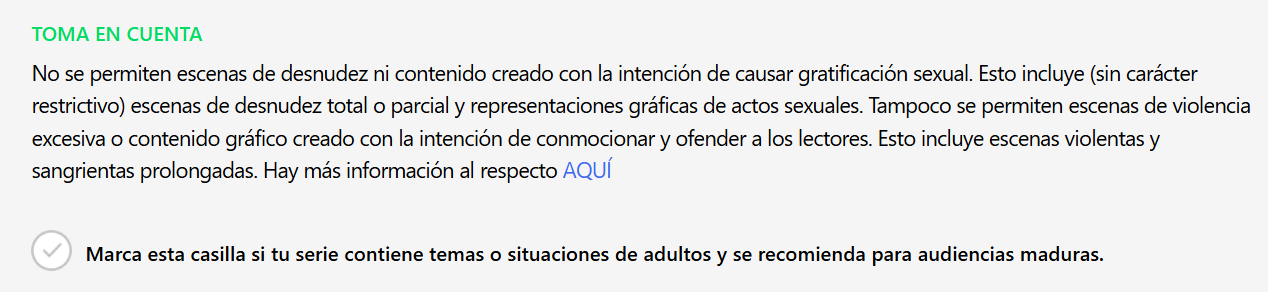
    1. No explicit NSFW content
      Webtoon Canvas prohibits nudity, sexual acts, sexualized minors, fetish content, or anything that can be interpreted as pornographic.
    2. No excessive gore or disturbing violence
      Mature content is acceptable in moderation, but extreme gore, torture, self-harm, or graphic violence can lead to rejection.
    3. No hate speech or discriminatory content
      Content targeting race, gender identity, religion, nationality, orientation, disability, etc., is automatically rejected.
    4. No glorification of harmful behavior
      This includes romanticizing suicide, self-harm, substance abuse, eating disorders, or extremist behavior.
    5. No extremely sensitive or illegal topics
      Child abuse, sexualization of minors, bestiality, extremist content, terrorist material, or realistic depictions of illegal activities will be denied.
    6. No misleading thumbnails or exploitative content
      Your cover, title, and preview images must match the tone of your episode and cannot be clickbait or sexualized.

    If your episodes violate any of these, Webtoon reviewers will immediately reject the Reward Ads request.


    How to Submit Reward Ad Episodes After Deleting Your Series

    If all your new episodes are clean and follow the rules, you can upload and submit them as usual.

    webtoon canvas reward ads submit

    Here’s the step-by-step process to maintain your Webtoon Canvas ad revenue:

    1. Upload your episode
    2. Tick “Submit for Reward Ads Review”
    3. Schedule the episode
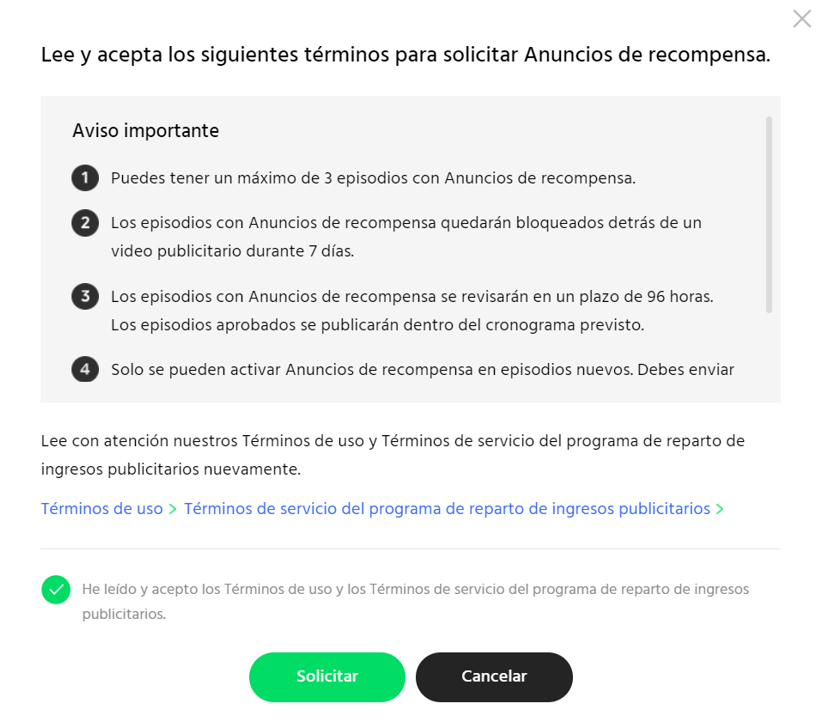
    4. Allow Webtoon at least 96 hours (4 days) to review
    5. Wait for approval
    6. Episode goes live as Early Access once approved

    It’s extremely important to note that Webtoon does not automatically approve Reward Ads episodes. Every single Early Access chapter must go through their review process. If they need extra time, your schedule may be delayed, so give yourself enough buffer time.


    What Happens If You Delete Your Whole Series First?

    Nothing negative will happen to your Reward Ads status:

    • Your Reward Ads approval remains
    • Your new episodes still qualify
    • Your new story starts clean
    • You can schedule Early Access as usual

    The ONLY thing that matters is that you were already accepted into the program before wiping your series. Deleting old episodes does not punish you, and it does not reset your eligibility for Webtoon Canvas ad revenue.


    Final Tips to Ensure Reward Ads Approval

    Before submitting your new episodes, make sure to:

    • Re-read Webtoon’s content guidelines ✔
    • Double-check panels for gore, nudity, or sensitive themes ✔
    • Ensure dialogue or jokes stay within acceptable limits ✔
    • Keep thumbnails safe and not sexualized ✔
    • Give Webtoon enough review time (minimum 96 hours, ideally 120+) ✔
    • Stay consistent with your new series tone ✔

    If you follow all these steps, your Reward Ad episodes will be approved without any issues — even after deleting all your previous Webtoon Canvas episodes.


    Need more guidance? Find what you need for your webtoon journey here.

  • Does Deleting Webtoon Canvas Episodes Affect Ad Revenue, Views, or Analytics?

    Does Deleting Webtoon Canvas Episodes Affect Ad Revenue, Views, or Analytics?

    Impact of Deleting Webtoon Canvas Episodes on Total Views

    A lot of Webtoon Canvas creators think that deleting episodes will reset the total page views on their series. But whether that’s good news or bad news for you… it doesn’t.
    Deleting episodes does not reset your total views, and it does not erase the views those episodes earned while they were still up. Your total page views stay exactly as they were.

    webtoon canvas creators
webtoon canvas ad revenue
deleting webtoon canvas episodes

    For example, let’s say you have a series with 10 episodes. Each episode gets views over time, and eventually your total hits a nice number. If you delete two episodes later on, those old views don’t disappear. They still count toward your total series views, even though the episodes are gone.

    Same with a full wipe. If your Canvas series shows 100,000 views, and you delete every episode, that 100k will still be there when you upload new content. That’s why you sometimes see rebooted Canvas series with massive view counts but only a few episodes – they kept their historical data.

    And if you have 10,000 Global Monthly Page Views so far this month, deleting episodes won’t make that number drop either. Webtoon Canvas still logs those views for the month even if the episodes that brought them in are gone.

    Even if you delete episodes and later upload new ones, the system works the same. Webtoon records all past interactions, no matter what content stays or goes. This means your analytics reflect the full history of your series’ engagement, not just what’s visible right now.

    One tip though: always track your own analytics. Webtoon Canvas keeps everything on their end, but they don’t show you long-term historical data. If you want detailed records, especially for growth planning, you’ll need to log it yourself.

    Bottom line: deleting Webtoon Canvas episodes doesn’t subtract from your total views at all. Your total series views always show the full engagement history, so you can make content decisions without worrying about losing those numbers.


    Webtoon Canvas Monthly Analytics and What Data Is Kept

    Monthly analytics on Webtoon Canvas reset every month, and the dashboard only shows the current month’s metrics. They don’t store long-term monthly history for creators to see, which is why it’s really helpful to manually keep your own analytics.

    The good part? Deleting webtoon canvas episodes doesn’t change past monthly analytics.
    So if you delete an episode this month, the views it earned last month (or any previous month) stay recorded in those past monthly totals.

    Let’s say you released a few episodes, they got a ton of views, and later you decided to delete them. Your past months’ analytics will still show the views those episodes earned while they were up.

    This is great because you still get a clear picture of your series’ overall growth over time, even if you’ve changed or removed some of the content.

    And don’t worry, if you delete episodes this month, your current month’s analytics won’t break or freeze. Webtoon Canvas still records new views normally, even after deletions.

    So overall, the system keeps your past data stable. But if your goal is to “reset everything” and start fresh, deleting episodes isn’t enough. To truly reset your views and analytics, you need to create a brand new series.


    Webtoon Canvas Likes and Comments: What Actually Gets Deleted?

    When deleting Webtoon Canvas episodes, you’ll see a warning that it’s permanent. And they mean it.
    All likes and comments tied to that episode are gone forever.

    webtoon canvas episodes
deleting webtoon canvas episodes

    That’s why a lot of comic creators take screenshots of their favorite comments before deleting Webtoon canvas episodes – it’s a way of keeping the memories.

    Likes show how much your audience enjoyed your content, so losing them can feel disappointing, even though it doesn’t hurt your future performance. It’s more of a mental/emotional thing; you might see fewer likes moving forward and feel discouraged.

    Comments are even more meaningful. They’re personal, encouraging, funny, or helpful. They create a bond between you and your audience.
    Once the episode is deleted, all those discussions disappear, no backups, no recovery.

    This is why it’s important to be emotionally prepared. If you delete episodes, you’re also letting go of the likes, the memories, and the comment history that came with them.


    Restoring Content and What This Means for Analytics

    Once you delete an episode on Webtoon Canvas, that’s it! It’s gone. You can’t restore it, re-upload it the old way, or get back the likes and comments.
    This can be tough, and some creators regret deleting content later. So make sure you’re 100% sure before confirming the deletion.

    Because Canvas doesn’t let you archive or hide episodes, deleting is really your only option if you don’t want something on your series anymore. That’s why planning ahead helps a lot.

    If you’re cleaning up your series, rebooting, or restructuring your story, try to keep your analytics in mind:

    • Record your numbers before deleting anything
    • Know exactly why you’re deleting an episode
    • Be prepared to lose likes and comments permanently [Screenshot comments you want to keep]
    • Understand that your total views will not reset
    • Create a new series if you want a real “fresh start”

    With that, you can manage your series more confidently and keep your analytics meaningful and organized. But again, be absolutely sure before deleting Webtoon Canvas episodes.


    Need more guidance? Find what you need for your webtoon journey here.